本文最后更新于213 天前,其中的信息可能已经过时,如有错误请留言
前言:之前还有很多功能并没有记录
阅读文章时,左侧功能栏显示同标签的其他文章,这样就不需要每次退出界面再点击标签过滤再选择文章了
functions.php中尾部添加如下代码:
<?php
// ========== 侧边标签切换:Shortcode + AJAX ==========

// 1) 只在文章页加载 css/js
add_action('wp_enqueue_scripts', function () {
    if (!is_single()) return;

    wp_enqueue_style(
        'tag-switcher-sidebar',
        get_stylesheet_directory_uri() . '/css/tag-switcher-sidebar.css',
        [],
        '1.0.0'
    );

    wp_enqueue_script(
        'tag-switcher-sidebar',
        get_stylesheet_directory_uri() . '/js/tag-switcher-sidebar.js',
        ['jquery'],
        '1.0.0',
        true
    );

    wp_localize_script('tag-switcher-sidebar', 'TagSwitcher', [
        'ajax_url' => admin_url('admin-ajax.php'),
        'nonce'    => wp_create_nonce('tag_switcher_nonce'),
        'post_id'  => get_queried_object_id(),
    ]);
});

// 2) Shortcode:输出标签按钮 + 列表
add_shortcode('tag_switcher_sidebar', function () {
    if (!is_single()) return '';

    $post_id = get_queried_object_id();
    if (!$post_id) return '';

    $tags = get_the_tags($post_id);
    if (!$tags || is_wp_error($tags)) {
        return '<div class="ts-box"><div class="ts-title">同标签文章</div><div class="ts-muted">该文章没有标签</div></div>';
    }

    $default_tag_id = (int)$tags[0]->term_id;

    ob_start(); ?>
    <div class="ts-box" data-post-id="<?php echo esc_attr($post_id); ?>">
        <div class="ts-title">同标签文章</div>

        <div class="ts-tags">
            <?php foreach ($tags as $i => $tag): ?>
                <button class="ts-tag <?php echo $i === 0 ? 'is-active' : ''; ?>"
                        type="button"
                        data-tag-id="<?php echo esc_attr($tag->term_id); ?>">
                    <?php echo esc_html($tag->name); ?>
                </button>
            <?php endforeach; ?>
        </div>

        <div class="ts-list-wrap">
            <ul class="ts-list">
                <?php echo ts_render_posts_by_tag($default_tag_id, $post_id, 8); ?>
            </ul>
            <div class="ts-loading" style="display:none;">加载中…</div>
        </div>
    </div>
    <?php
    return ob_get_clean();
});

// 3) 渲染某个标签下的文章列表(返回 <li>...)
function ts_render_posts_by_tag($tag_id, $current_post_id, $limit = 8) {
    $q = new WP_Query([
        'post_type'           => 'post',
        'posts_per_page'      => $limit,
        'ignore_sticky_posts' => true,
        'tag_id'              => (int)$tag_id,
        'post__not_in'        => [(int)$current_post_id],
        'no_found_rows'       => true,
    ]);

    if (!$q->have_posts()) {
        return '<li class="ts-item ts-muted">该标签下暂无其他文章</li>';
    }

    $html = '';
    while ($q->have_posts()) {
        $q->the_post();
        $html .= '<li class="ts-item">';
        $html .= '<a class="ts-link" href="' . esc_url(get_permalink()) . '">' . esc_html(get_the_title()) . '</a>';
        $html .= '<span class="ts-date">' . esc_html(get_the_date('Y-m-d')) . '</span>';
        $html .= '</li>';
    }
    wp_reset_postdata();
    return $html;
}

// 4) AJAX:切换标签时返回列表
add_action('wp_ajax_tag_switcher_get_posts', 'ts_ajax_get_posts');
add_action('wp_ajax_nopriv_tag_switcher_get_posts', 'ts_ajax_get_posts');

function ts_ajax_get_posts() {
    check_ajax_referer('tag_switcher_nonce', 'nonce');

    $tag_id  = isset($_POST['tag_id']) ? (int)$_POST['tag_id'] : 0;
    $post_id = isset($_POST['post_id']) ? (int)$_POST['post_id'] : 0;

    if ($tag_id <= 0 || $post_id <= 0) {
        wp_send_json_error(['message' => '参数错误']);
    }

    $html = ts_render_posts_by_tag($tag_id, $post_id, 8);
    wp_send_json_success(['html' => $html]);
}
wp-content/themes/argon/ 中创建tag-switcher-sidebar.js
jQuery(function ($) {
  const $box = $(".ts-box");
  if (!$box.length) return;

  $box.on("click", ".ts-tag", function () {
    const $btn = $(this);
    const tagId = $btn.data("tag-id");

    $btn.addClass("is-active").siblings().removeClass("is-active");

    const $wrap = $btn.closest(".ts-box");
    const postId = TagSwitcher.post_id;

    const $list = $wrap.find(".ts-list");
    const $loading = $wrap.find(".ts-loading");

    $loading.show();

    $.post(TagSwitcher.ajax_url, {
      action: "tag_switcher_get_posts",
      nonce: TagSwitcher.nonce,
      tag_id: tagId,
      post_id: postId,
    })
      .done(function (res) {
        if (res && res.success) {
          $list.html(res.data.html);
        } else {
          $list.html('<li class="ts-item ts-muted">加载失败</li>');
        }
      })
      .fail(function () {
        $list.html('<li class="ts-item ts-muted">网络错误</li>');
      })
      .always(function () {
        $loading.hide();
      });
  });
});
创建tag-switcher-sidebar.css
.ts-box { border: 1px solid rgba(0,0,0,.08); border-radius: 10px; padding: 14px; background: #fff; }
.ts-title { font-weight: 700; margin-bottom: 10px; }
.ts-tags { display: flex; flex-wrap: wrap; gap: 8px; margin-bottom: 12px; }
.ts-tag { border: 1px solid rgba(0,0,0,.12); background: #f7f7f7; padding: 6px 10px; border-radius: 999px; cursor: pointer; font-size: 13px; }
.ts-tag.is-active { background: #111; color: #fff; border-color: #111; }
.ts-list { list-style: none; margin: 0; padding: 0; }
.ts-item { display: flex; align-items: baseline; justify-content: space-between; gap: 10px; padding: 8px 0; border-top: 1px dashed rgba(0,0,0,.08); }
.ts-item:first-child { border-top: none; padding-top: 0; }
.ts-link { text-decoration: none; color: inherit; flex: 1; }
.ts-link:hover { text-decoration: underline; }
.ts-date { font-size: 12px; opacity: .6; white-space: nowrap; }
.ts-muted { opacity: .6; }
.ts-loading { margin-top: 10px; font-size: 13px; opacity: .7; }
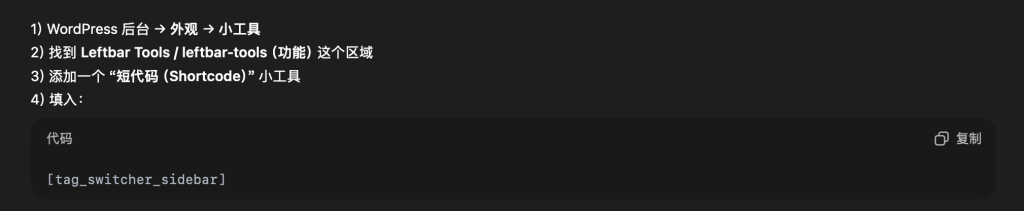
把短代码放进侧边栏显示